📜 Inventur / Physical Inventory Count
Beschreibung / Description
🇩🇪 Eine Inventur in Business Central folgt einem klar strukturierten, dreistufigen Prozess: Vorbereiten, Zählen und Buchen. Das Ziel ist es, den rechnerischen Systembestand mit dem tatsächlich gezählten physischen Lagerbestand abzugleichen und eventuelle Differenzen wertmäßig und mengenmäßig sauber im Hauptbuch zu korrigieren. Hier ist die allgemeingültige Beschreibung des Ablaufs, wie er im BC-Standard durchgeführt wird:
🇬🇧 A physical inventory in Business Central follows a clearly structured, three-stage process: Prepare, Count, and Post. The objective is to reconcile the calculated system inventory with the actually counted physical stock and to accurately correct any variances in both quantity and value within the general ledger. Here is the general description of the workflow as it is performed in the BC standard:
🇪🇸 Un inventario físico en Business Central sigue un proceso de tres etapas claramente estructurado: Preparar, Contar y Registrar. El objetivo es conciliar el inventario calculado por el sistema con el inventario físico real registrado y corregir adecuadamente cualquier diferencia, tanto en cantidad como en valor, en el libro mayor. A continuación, se presenta la descripción general del flujo de trabajo tal como se realiza en el estándar de BC:
🇨🇿 Fyzická inventura v Business Central sleduje jasně strukturovaný třístupňový proces: Příprava, Sčítání a Účtování. Cílem je odsouhlasit vypočtený stav zásob v systému se skutečně zjištěným fyzickým stavem zásob a správně opravit případné rozdíly v množství a hodnotě v hlavní knize. Zde je obecný popis postupu, jak probíhá ve standardním systému BC:
🇸🇮 Popis zalog (inventura) v Business Central sledi jasno strukturiranemu tristopenjskemu procesu: Priprava, Štetje in Knjiženje. Cilj je uskladiti izračunano stanje zalog v sistemu z dejansko prešteto fizično zalogo ter natančno popraviti morebitne razlike v količini in vrednosti v glavni knjigi. Tukaj je splošen opis poteka dela, kot se izvaja v standardni različici BC:
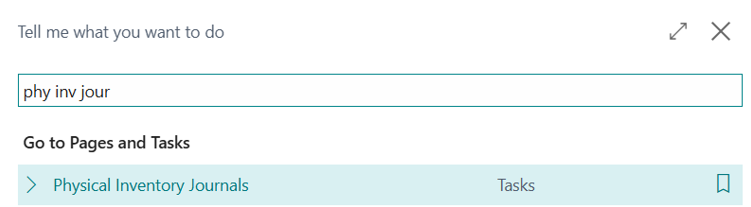
1. Vorbereitung (Bestand einfrieren) / Preparation (Freezing Inventory)
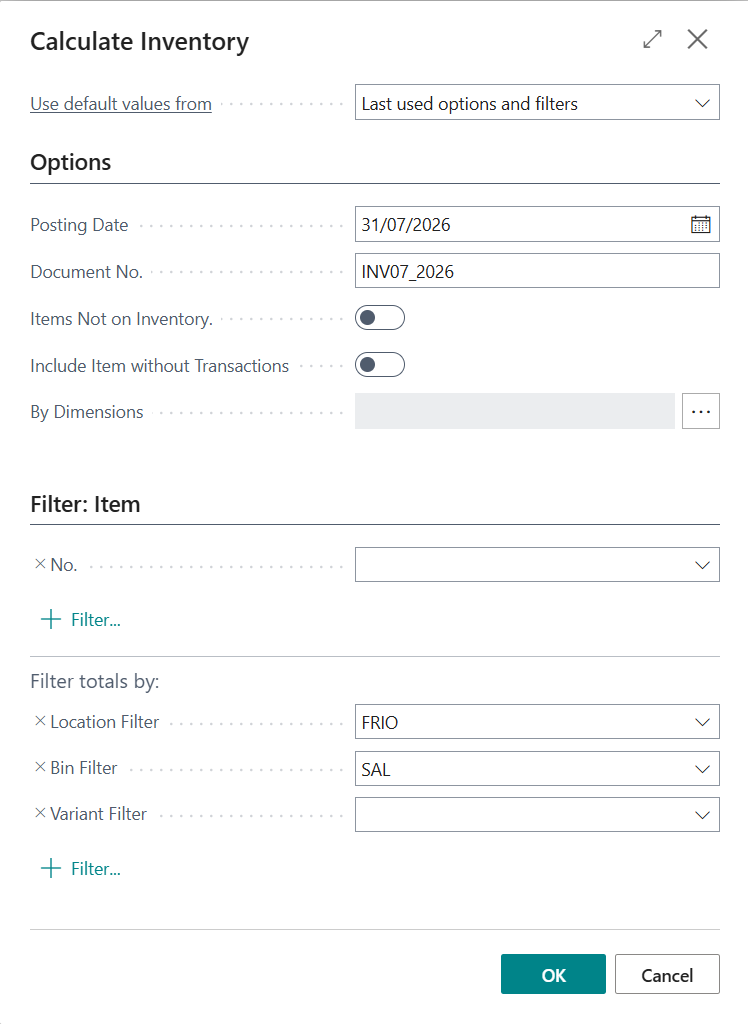
🇩🇪 Bevor die Mitarbeiter im Lager mit den Zähllisten loslaufen, wird der aktuelle Systembestand im Inventur-Buchblatt fixiert. Funktion „Bestand berechnen“: Über diesen Report wird das Inventury-Buchblatt mit den aktuellen Buchbeständen gefüllt.
🇬🇧 Before the warehouse employees start heading out with the counting lists, the current system inventory is fixed in the physical inventory journal. "Calculate Inventory" function: This report is used to fill the physical inventory journal with the current book inventories.
🇪🇸 Antes de que los empleados del almacén comiencen a desplazarse con las listas de recuento, el inventario actual del sistema se fija en el diario de inventario físico. Función "Calcular inventario": este informe se utiliza para rellenar el diario de inventario físico con las existencias registradas actuales.
🇨🇿 Než skladníci vyrazí s inventurními seznamy, zafixuje se aktuální stav zásob v systému v deníku fyzické inventury. Funkce „Vypočítat zásoby“: Pomocí této sestavy se deník fyzické inventury naplní aktuálními účetními stavy zásob.
🇸🇮 Preden zaposleni v skladišču začnejo s štetjem s pomočjo popisnih listov, se trenutno stanje zalog v sistemu fiksira v dnevniku popisa zalog. Funkcija »Izračunaj zalogo«: s tem poročilom se dnevnik popisa zalog napolni s trenutnimi knjižnimi stanji zalog.
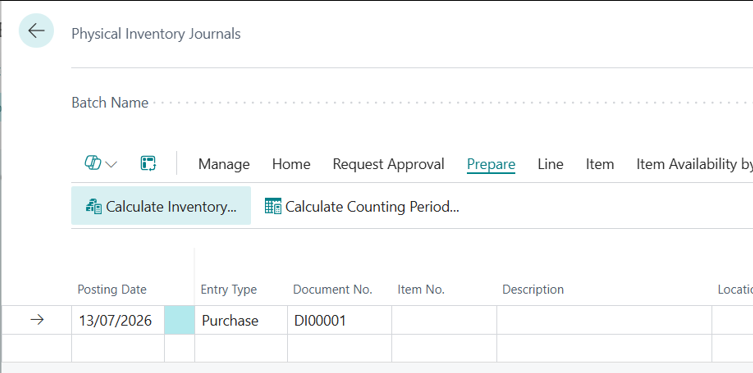
🇩🇪 Man kann hier nach Lagerorten, Lagerplätzen oder Artikeln filtern.
🇬🇧 You can filter here by locations, bins, or items.
🇪🇸 Aquí se puede filtrar por almacenes, ubicaciones o productos.
🇨🇿 Zde můžete filtrovat podle kódů lokací, přihrádek nebo zboží.
🇸🇮 Tukaj lahko filtrirate po lokacijah, predalih ali artiklih.
⚠️ ACHTUNG / ATTENTION
🇩🇪 Ausschluss von Buchungen: Während der Zählung dürfen für die betroffenen Artikel keine regulären Lagerbewegungen (Wareneingänge, Warenausgänge, Verbräuche) gebucht werden, um das Ergebnis nicht zu verfälschen.
🇬🇧 Exclusion of postings: During the count, no regular inventory movements (receipts, shipments, consumptions) may be posted for the affected items in order to prevent the results from being distorted.
🇪🇸 Exclusión de registros: durante el recuento, no se deben registrar movimientos de inventario regulares (recepciones, envíos, consumos) para los productos afectados, a fin de evitar que se distorsionen los resultados.
🇨🇿 Vyloučení účtování: Během sčítání nesmí být pro dotčené zboží účtovány žádné běžné pohyby zásob (příjmy, dodávky, spotřeby), aby nedošlo ke zkreslení výsledků.
🇸🇮 Izključitev knjiženj: med štetjem se za zadevne artikle ne smejo knjižiti redni premiki zalog (prevzemi, izdaje, poraba), da se prepreči popačenje rezultatov.
🇩🇪 Drucken der Zählliste: Aus dem Buchblatt wird die Inventur-Zählliste gedruckt (oder digital bereitgestellt). Wichtig: Diese Liste enthält für die Mitarbeiter im Normalfall keine Systemmengen (Blindzählung), sondern nur die Artikelnummern, Beschreibungen und Lagerplätze.
🇬🇧 Printing the counting list: The physical inventory counting list is printed (or provided digitally) from the journal. Important: This list normally does not contain system quantities for the employees (blind count), but only the item numbers, descriptions, and bins.
🇪🇸 Impresión de la lista de recuento: la lista de recuento de inventario físico se imprime (o se proporciona digitalmente) desde el diario. Importante: esta lista normalmente no contiene las cantidades del sistema para los empleados (recuento a ciegas), sino solo los números de producto, las descripciones y las ubicaciones.
🇨🇿 Tisk inventurního seznamu: Z deníku se vytiskne (nebo digitálně poskytne) inventurní seznam pro sčítání. Důležité: Tento seznam obvykle neobsahuje pro zaměstnance množství ze systému (slepé sčítání), ale pouze čísla zboží, popisy a přihrádky.
🇸🇮 Tiskanje popisnega lista: iz dnevnika se natisne (ali digitalno zagotovi) popisni list za štetje. Pomembno: ta list za zaposlene običajno ne vsebuje količin iz sistema (slepo štetje), temveč le šifre artiklov, opise in predale.
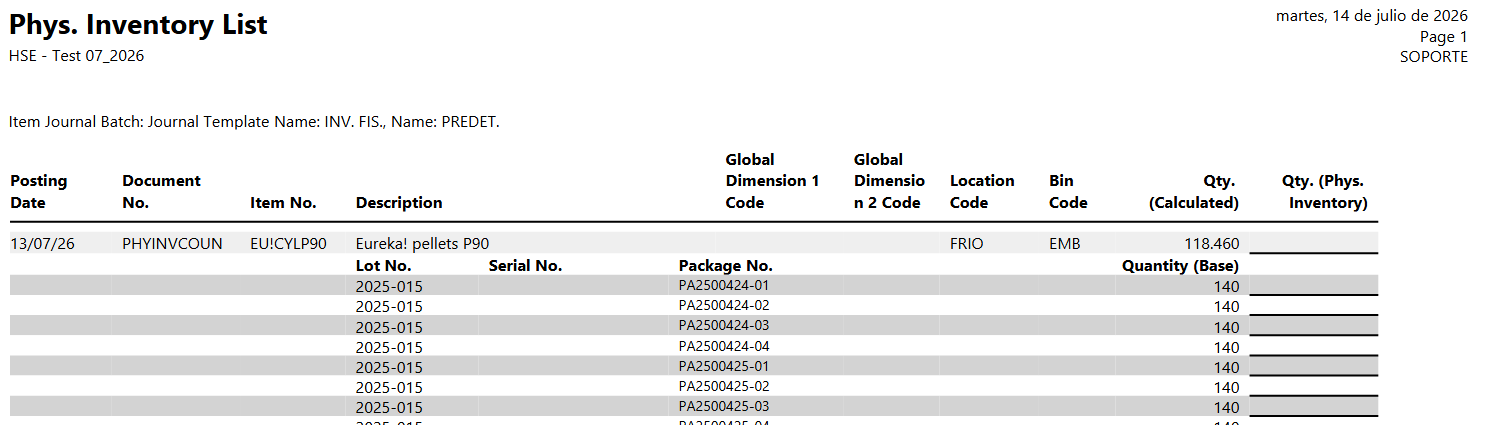
🇩🇪 Der Druck kann wiederum für einzelne Lagerorte, Lagerplätze, Artikel etc. gefiltert werden. Weiter kann hier der Andruck der berechneten Menge sowie der Artikelverfolgungsinformationen wie Chargennummer und Paketnummer angedruckt werden. Über den Button Senden kann die Liste auch in Excel exportiert werden.
🇬🇧 The printout can again be filtered for individual locations, bins, items, etc. Furthermore, you can choose to print the calculated quantity as well as item tracking information such as lot number and package number. Using the Send to button, the list can also be exported to Excel.
🇪🇸 La impresión se puede filtrar nuevamente por almacenes, ubicaciones, productos, etc. individuales. Además, aquí se puede imprimir la cantidad calculada, así como la información de seguimiento del producto, como el número de lote y el número de paquete. A través del botón Enviar a, la lista también se puede exportar a Excel.
🇨🇿 Tisk lze opět filtrovat podle jednotlivých lokací, přihrádek, zboží atd. Dále je zde možné vytisknout vypočtené množství a také informace o sledování zboží, jako je číslo šarže a číslo balíčku. Pomocí tlačítka Odeslat do lze seznam exportovat také do Excelu.
🇸🇮 Tiskanje je mogoče znova filtrirati za posamezne lokacije, predale, artikle itd. Poleg tega se lahko tukaj natisne izračunana količina in podatki o sledenju artiklov, kot sta številka serije in številka paketa. Preko gumba Pošlji v je mogoče seznam izvoziti tudi v Excel.
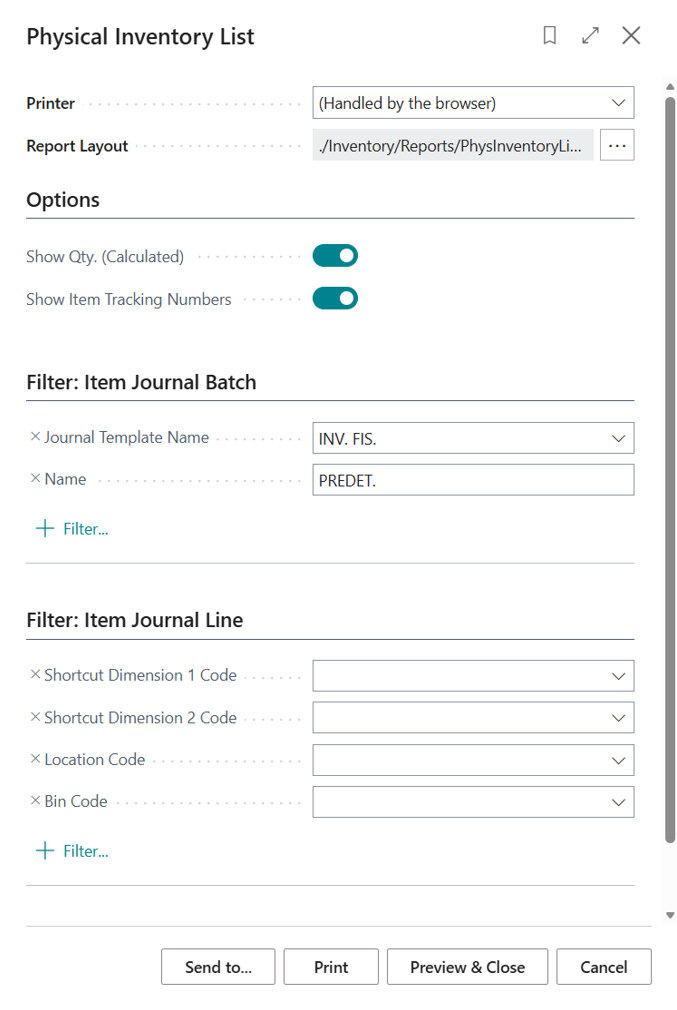
🇩🇪 Beispieldruck:
🇬🇧 Sample print / Print preview:
🇪🇸 Impresión de muestra / Vista previa de impresión:
🇨🇿 Ukázka tisku / Náhled tisku:
🇸🇮 Vorec tiskanja / Predogled tiskanja:
2. Erfassung (Die Zählung) / Recording (The Count)
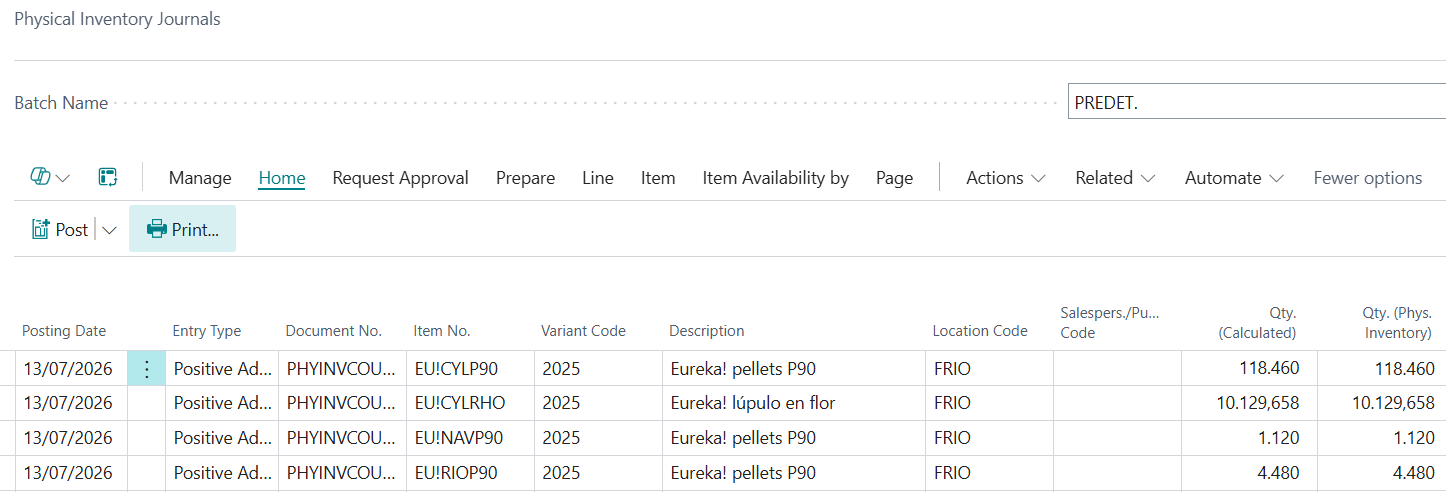
🇩🇪 Die physisch gezählten Mengen werden nun aus der Realität zurück in das System übertragen. Eingabe der Ist-Menge: Im Feld Inventurmenge (Ist-Menge) tragen die Mitarbeiter die tatsächlich gezählte Menge ein. Automatische Differenzermittlung: Business Central vergleicht die eingegebene Inventurmenge automatisch mit der berechneten Menge (Buchbestand). Ist die gezählte Menge größer, ermittelt das System einen Positiven Ausgleich. Ist die gezählte Menge kleiner, entsteht ein Negativer Ausgleich.
🇬🇧 The physically counted quantities are now transferred from reality back into the system. Entering the actual quantity: In the "Qty. (Phys. Inventory)" (actual quantity) field, employees enter the quantity actually counted. Automatic variance determination: Business Central automatically compares the entered physical inventory quantity with the calculated "Qty. (Calculated)" (book inventory). If the counted quantity is greater, the system calculates a positive adjustment. If the counted quantity is smaller, a negative adjustment is created.
🇪🇸 Las cantidades contadas físicamente se transfieren ahora de la realidad al sistema. Entrada de la cantidad real: en el campo "Cantidad (inv. físico)" (cantidad real), los empleados introducen la cantidad realmente contada. Determinación automática de diferencias: Business Central compara automáticamente la cantidad de inventario físico introducida con la "Cantidad (calculada)" (existencias registradas). Si la cantidad contada es mayor, el sistema calcula un ajuste positivo. Si la cantidad contada es menor, se genera un ajuste negativo.
🇨🇿 Fyzicky zjištěné množství se nyní přenese z reality zpět do systému. Zadání skutečného množství: Do pole „Množství (fyz. inventura)“ (skutečné množství) zadají zaměstnanci skutečně nasčítané množství. Automatické zjištění rozdílů: Business Central automaticky porovná zadané množství fyzické inventury s vypočteným „Množství (vypočtené)“ (účtovaný stav). Pokud je nasčítané množství větší, systém určí kladnou odchylku. Pokud je nasčítané množství menší, vzniká záporná odchylka.
🇸🇮 Fizično preštete količine se zdaj iz realnosti prenesejo nazaj v sistem. Vnos dejanske količine: v polje »Količina (popis zalog)« (dejanska količina) zaposleni vnesejo dejansko prešteto količino. Samodejno ugotavljanje razlik: Business Central samodejno primerja vneseno količino popisa zalog z izračunano »Količina (izračunano)« (knjižna zaloga). Če je prešteta količina večja, sistem izračuna pozitivno uskladitev. Če je prešteta količina manjša, nastane negativna uskladitev.

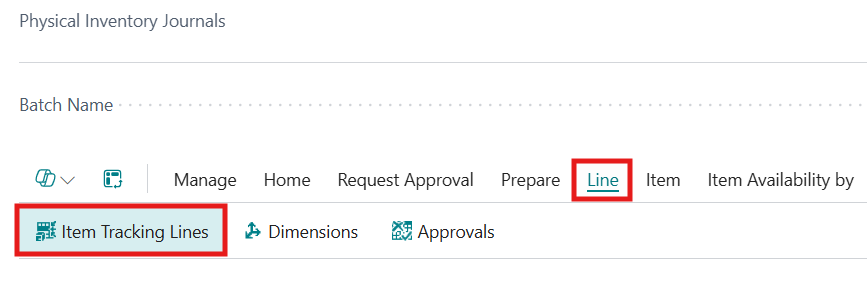
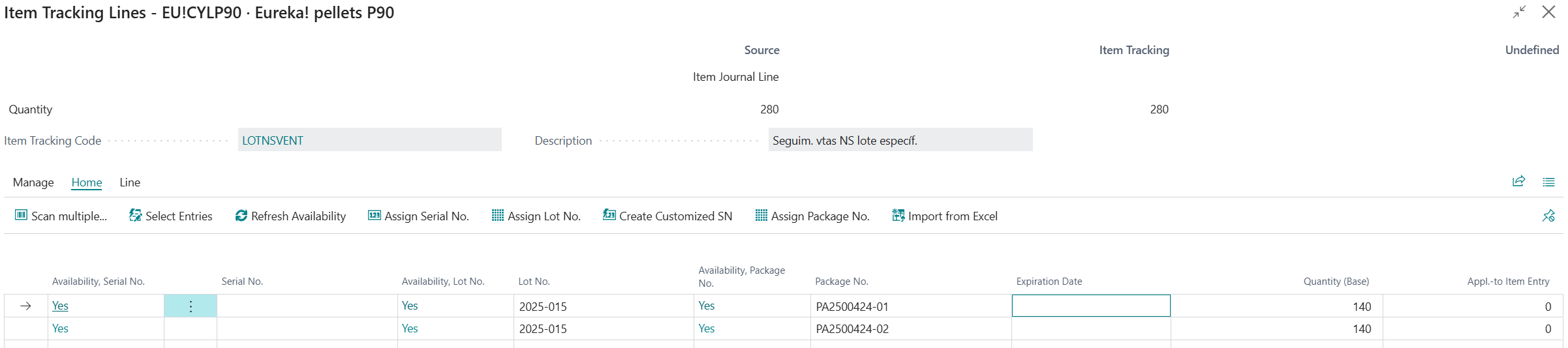
[!IMPORTANT] 🇩🇪 Sofern die Artikelverfolgung (Chargennummer / Paketnummer) für die Artikel verwendet wird, sind die zu korrigierenden Informationen bzgl. der Artikelverfolgung anzugeben.
🇬🇧 If item tracking (lot number / package number) is used for the items, the information to be corrected regarding the item tracking must be specified.
🇪🇸 Si se utiliza el seguimiento de producto (número de lote / número de paquete) para los productos, se debe especificar la información a corregir en relación con el seguimiento de producto.
🇨🇿 Pokud se pro zboží používá sledování zboží (číslo šarže / číslo balíčku), je nutné uvést informace o sledování zboží, které mají být opraveny.
🇸🇮 Če se za artikle uporablja sledenje artiklov (številka serije / številka paketa), je treba navesti podatke o sledenju artiklov, ki jih je treba popraviti.
3. Abschluss (Buchen der Differenzen) / Completion (Posting Variances)
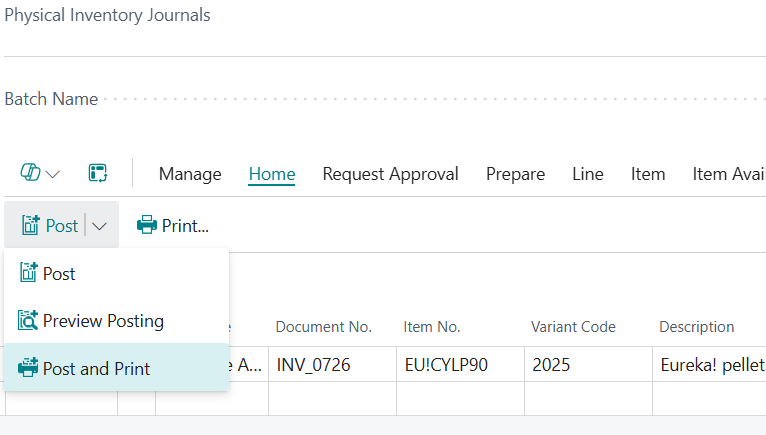
🇩🇪 Nachdem alle Mengen erfasst und eventuelle Stichproben oder Kontrollen durchgeführt wurden, wird die Inventur abgeschlossen. Das Buchen: Beim Buchen des Inventur-Buchblatts werden nur die Differenzen wert- und mengenmäßig auf die entsprechenden Sachkonten (Lagerkorrekturkonten) gebucht. Lagerregulierung: Nach dem Buchen spiegelt der Systembestand exakt die gezählte Realität wider. Im Hintergrund werden die Artikelposten aktualisiert und der Lagerwert im Hauptbuch korrigiert.
🇬🇧 After all quantities have been recorded and any spot checks or audits have been performed, the physical inventory is completed. Posting: When posting the physical inventory journal, only the variances are posted in terms of both quantity and value to the corresponding G/L accounts (inventory adjustment accounts). Inventory adjustment: After posting, the system inventory accurately reflects the counted reality. In the background, the item ledger entries are updated and the inventory value is adjusted in the general ledger.
🇪🇸 Una vez registradas todas las cantidades y realizadas las comprobaciones aleatorias o controles pertinentes, se completa el inventario físico. Registro: al registrar el diario de inventario físico, solo se registran las diferencias, tanto en cantidad como en valor, en las cuentas contables correspondientes (cuentas de ajuste de inventario). Ajuste de inventario: después del registro, el inventario del sistema refleja exactamente la realidad del recuento. En segundo plano, se actualizan los movimientos de producto y se corrige el valor de las existencias en el libro mayor.
🇨🇿 Poté, co byla zadána všechna množství a byly provedeny případné namátkové kontroly, je fyzická inventura dokončena. Účtování: Při účtování deníku fyzické inventury se do příslušných věcných účtů (účtů úpravy zásob) zaúčtují pouze rozdíly, a to jak v množství, tak v hodnotě. Úprava zásob: Po zaúčtování odráží stav zásob v systému přesně skutečnost zjištěnou sčítáním. Na pozadí se aktualizují věcné položky zboží a v hlavní knize se opraví hodnota zásob.
🇸🇮 Ko so vnesene vse količine ter opravljeni morebitni naključni pregledi ali kontrole, se popis zalog zaključi. Knjiženje: ob knjiženju dnevnika popisa zalog se na ustrezne konte glavne knjige (konte popravkov zalog) knjižijo le količinske in vrednostne razlike. Uskladitev zalog: po knjiženju stanje zalog v sistemu natančno odraža dejansko stanje štetja. V ozadju se posodobijo knjižbe artiklov, vrednost zaloge pa se popravi v glavni knjigi.


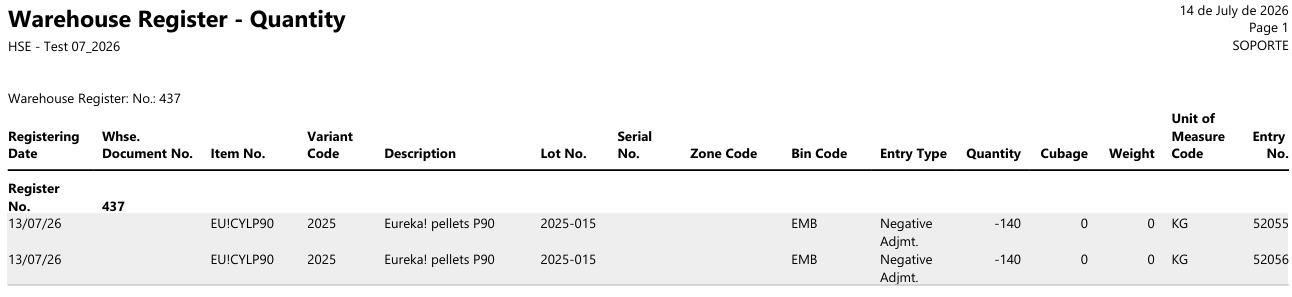
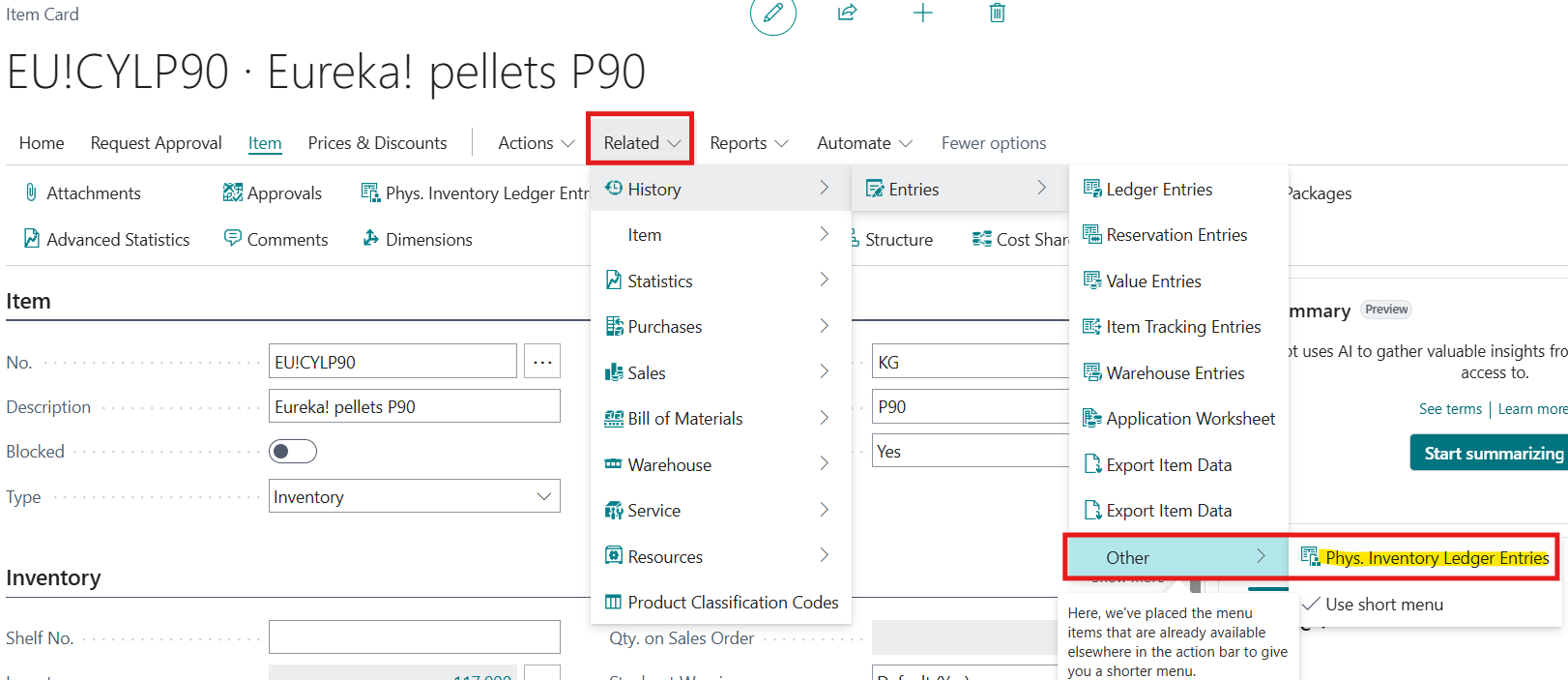
🇩🇪 Ergebnis der Inventurbuchung kann in den Artikelposten sowie aus der Artikelkarte über die Historie und Inventurposten eingesehen werden. Für jede Inventurbuchung, auch wenn diese mit der berechneten Menge bestätigt wird und keine Abweichung gebucht wird, wird ein sog. Inventurposten im System geschrieben.
🇬🇧 The result of the physical inventory posting can be viewed in the item ledger entries as well as from the item card via history and physical inventory ledger entries. For every physical inventory posting, even if it is confirmed with the calculated quantity and no variance is posted, a so-called physical inventory ledger entry is written in the system.
🇪🇸 El resultado del registro de inventario físico se puede consultar en los movimientos de producto, así como desde la ficha de producto a través del historial y los movimientos de inventario físico. Para cada registro de inventario físico, incluso si se confirma con la cantidad calculada y no se registra ninguna diferencia, se crea en el sistema un denominado movimiento de inventario físico.
🇨🇿 Výsledek účtování fyzické inventury lze zobrazit ve věcných položkách zboží a také z karty zboží prostřednictvím historie a věcných položek fyzické inventury. Pro každé účtování fyzické inventury, i když je potvrzeno s vypočteným množstvím a není zaúčtována žádná odchylka, se v systému vytvoří takzvaná věcná položka fyzické inventury.
🇸🇮 Rezultat knjiženja popisa zalog si lahko ogledate v knjižbah artiklov ter na kartici artikla prek zgodovine in knjižb popisa zalog. Za vsako knjiženje popisa zalog, tudi če je potrjeno z izračunano količino in ni knjiženo nobeno odstopanje, se v sistemu ustvari tako imenovana knjižba popisa zalog.


4. Ergänzende Hinweise / Supplementary Notes
⚠️ 🇩🇪 Hinweis zur Zyklischen Inventur: Neben der klassischen Stichtagsinventur (z. B. zum Jahresabschluss) unterstützt Business Central auch die zyklische Inventur (Cycle Counting). Dabei werden Artikel basierend auf einem zugewiesenen Inventurzeitraum (z. B. A-Artikel monatlich, C-Artikel jährlich) rollierend über das Jahr verteilt gezählt.
⚠️ 🇬🇧 Note on Cycle Counting: In addition to the classic annual physical inventory (e.g., at the end of the fiscal year), Business Central also supports cycle counting. In this process, items are counted on a rotational basis throughout the year based on an assigned physical inventory period (e.g., A-items monthly, C-items annually).
⚠️ 🇪🇸 Nota sobre el recuento cíclico: Además del clásico inventario físico anual (por ejemplo, al cierre del ejercicio), Business Central también admite el recuento cíclico (cycle counting). En este proceso, los productos se cuentan de forma rotativa a lo largo del año en función de un período de inventario físico asignado (por ejemplo, los productos A mensualmente, los productos C anualmente).
⚠️ 🇨🇿 Poznámka k cyklické inventuře: Vedle klasické roční fyzické inventury (např. na konci účetního roku) podporuje Business Central také cyklickou inventuru (cycle counting). Při ní se zboží počítá rotačně v průběhu celého roku na základě přiřazeného období fyzické inventury (např. zboží typu A měsíčně, zboží typu C ročně).
⚠️ 🇸🇮 Opomba o cikličnem popisu zalog: Poleg klasičnega letnega popisa zalog (npr. ob koncu poslovnega leta) Business Central podpira tudi ciklični popis zalog (cycle counting). Pri tem se artikli štetje izvaja rotacijsko čez celotno leto na podlagi dodeljenega obdobja popisa zalog (npr. artikli razreda A mesečno, artikli razreda C letno).